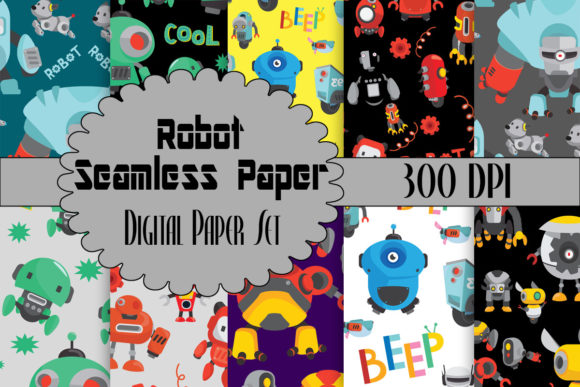
Robot Seamless Paper Backgrounds: A Practical Guide for Creators
Digital design assets have transformed how we approach creativity, offering speed and flexibility that physical materials simply cannot match. Among the most versatile tools in a modern creator’s toolkit are Robot Seamless Paper Backgrounds. These digital papers feature charming, cute robotic machines set against varying color palettes, designed specifically to streamline your workflow in card making, scrapbooking, web design, and graphic projects. However, simply downloading a pack is not enough to guarantee professional results. Many creators stumble over technical nuances that can compromise the quality of their final output.
Understanding the specific characteristics of this 12×12 inch digital paper pack is essential. You receive ten high-resolution, 300 DPI JPG files, which is the industry standard for print-quality crafts. Yet, even with high-quality source files, mistakes in handling, scaling, or color management can lead to disappointing outcomes. This guide aims to help you navigate these common pitfalls, ensuring you get the most value from your purchase while avoiding costly errors in time and materials.
The Resolution Trap: Why 300 DPI Matters
One of the most frequent misunderstandings among beginners involves resolution. When you download Robot seamless paper backgrounds, you are provided with files at 300 dots per inch (DPI). This density is crucial for physical crafts like card making and scrapbooking. A common mistake is resizing these images in software without maintaining the aspect ratio or inadvertently lowering the resolution during export.
If you stretch a 12×12 inch image to fit a larger format without checking the pixel dimensions, the image will become pixelated. This results in blurry edges on those cute robotic elements, ruining the crisp, professional look you aim for. For web and graphic designs, you might be tempted to use the full 300 DPI file, which can unnecessarily slow down website loading times. Conversely, using a low-resolution web preview for a printed invitation will result in a grainy, unprofessional finish.
The Better Approach: Always check the pixel dimensions before starting your project. For a 12×12 inch print at 300 DPI, the image should be 3600×3600 pixels. If you are designing for the web, resize the image to 72 DPI or appropriate pixel dimensions for screens only after you have finished your layout. Keep your original high-res files untouched as a master copy.
Misunderstanding "Seamless" in Digital Contexts
The term "seamless" often causes confusion. In the context of this digital paper pack, it means the pattern repeats perfectly without visible lines when tiled. However, many users assume they can apply these backgrounds to any shape or size without adjustment. This is incorrect. If you place a robot-themed background into a circular frame or a non-square aspect ratio without proper positioning, you may cut off key elements of the robotic machines awkwardly.
Another overlooked detail is the directionality of the pattern. While seamless patterns repeat, the orientation of the cute robotic machines matters. Placing a background upside down or rotated 90 degrees might not look "wrong," but it could disrupt the visual flow of your design, especially if the robots have a perceived direction of movement or gaze.
Practical Advice: Before finalizing your design, zoom out and view the entire composition. Ensure that the robotic elements are not cropped in a way that looks accidental. If you are tiling the background for a large banner, preview the repeat pattern to ensure no obvious clusters of robots create a visual imbalance.
Color Consistency and Print Expectations
Digital screens emit light, while paper reflects it. This fundamental difference leads to one of the most frustrating issues for crafters: color mismatch. The varying colors of elements and background colors in your Robot Seamless Paper Backgrounds may look vibrant and neon on your monitor but print muted or dull on home printers. This is not a defect in the file; it is a limitation of the RGB (screen) versus CMYK (print) color spaces.
Many entrepreneurs and small business owners make the mistake of printing directly from a standard photo editor without soft-proofing. This can lead to wasted paper and ink, increasing the cost per unit for your handmade cards or scrapbook pages. Furthermore, different paper stocks absorb ink differently. Glossy photo paper will render the bright colors of the robotic machines more vividly than matte cardstock, which may mute the tones.
How to Avoid This: If you are selling physical products, always order a test print. Adjust the brightness and contrast of your digital file slightly higher than what looks good on screen to compensate for ink absorption. Consider using ICC profiles specific to your printer and paper type if you want precise color matching. For web designs, remember that colors will vary across devices, so focus on contrast and readability rather than exact hue matching.
Licensing and Commercial Use Clarity
For freelancers, marketers, and small business owners, understanding usage rights is critical. A common error is assuming that purchasing a digital paper pack grants unlimited rights to resell the digital file itself. This is rarely the case. Typically, you are licensed to use the Robot seamless paper backgrounds in end products—such as printed greeting cards, wedding invitations, or website backgrounds—but you cannot redistribute the JPG files as standalone digital products.
Overlooking this distinction can lead to copyright infringement issues, which can damage your reputation and result in legal complications. Additionally, some creators fail to credit the artist when required, although many modern packs do not require attribution. It is essential to read the specific license agreement included with your download.
Best Practice: Treat these digital papers as raw materials, not final products. Integrate them into unique designs by adding text, other graphics, or photos. This not only adheres to most standard licensing agreements but also adds value to your creations, distinguishing your work from others who might use the same pack.
Organizing Your Digital Assets for Efficiency
With ten high-res JPG files in this collection, organization might seem trivial. However, as your library of digital assets grows, finding the right background becomes time-consuming. A frequent oversight is saving files with generic names like "image1.jpg" or leaving them in the downloads folder. This leads to inefficiency, where you spend more time searching for the perfect robotic pattern than actually designing.
Moreover, failing to back up your purchased assets can result in loss of access if the vendor’s site goes down or your hard drive fails. Losing a favorite pack means repurchasing it or scrambling for alternatives mid-project.
Solution: Create a dedicated folder structure on your computer or cloud storage. Name files descriptively, such as "Robot_Seamless_Blue_Background_300DPI.jpg." Back up your entire digital asset library regularly. This small habit saves hours of frustration and ensures you can always access your trusted resources.
Making the Right Choice for Your Project
Before you begin designing, ask yourself: Does this theme fit my audience? The cute robotic machines in this pack are playful and whimsical. They are ideal for children’s birthday invitations, tech-themed party decor, or educational materials for STEM programs. However, they may not suit formal corporate reports or elegant wedding stationery unless used very sparingly as a subtle accent.
Evaluating the suitability of Robot Seamless Paper Backgrounds for your specific niche prevents wasted effort. If you are creating content for a serious financial blog, these backgrounds might distract rather than engage. But for a toy store flyer or a kindergarten teacher’s newsletter, they are perfect.
Ultimately, the value of this digital paper pack lies in its versatility and quality. By respecting resolution limits, understanding color behavior, adhering to licensing terms, and organizing your files, you transform a simple download into a powerful asset for your creative business. Take the time to learn these nuances, and your crafts and designs will reflect a level of professionalism that stands out in a crowded market.