Digital Frames: Versatile Design Assets
In the world of digital design and physical crafting, presentation is everything. Whether you are showcasing a cherished wedding photograph, creating a custom label for a handmade product, or designing a social media graphic, the border around your content matters just as much as the content itself. This is where a digital frame becomes an indispensable tool for creators. Unlike traditional physical frames that require wood, glass, and nails, digital frames are versatile graphic assets that can be scaled, edited, and applied instantly to any project. They bridge the gap between professional graphic design and accessible DIY crafting, offering a polished look without the steep learning curve.
Understanding the Value of Vector and Raster Formats
One of the most common questions for beginners is understanding the different file types included in a comprehensive design bundle. A high-quality collection typically provides multiple formats to ensure compatibility with various software and machines. For instance, SVG files (Scalable Vector Graphics) are essential for users of cutting machines like the Silhouette Cameo or Cricut. Because they are vector-based, these files can be resized infinitely without losing quality. This makes a square frame svg or a complex wedding frame perfect for projects ranging from small jewelry tags to large wall decals.
On the other hand, PNG files are raster images with transparent backgrounds. These are ideal for digital use, such as adding a decoration frame to a blog post, an eBook cover, or a digital invitation. With a high resolution of 300 dpi, these PNGs also hold up well for standard home printing. For professional graphic designers using Adobe Illustrator or CorelDRAW, EPS files offer full editability, allowing you to change colors, adjust nodes, and modify shapes to fit specific brand guidelines. Finally, DXF files serve as a universal alternative for older cutting software, ensuring that no creator is left behind due to software limitations.
Practical Applications for Creators and Entrepreneurs
The utility of a digital frame dxf or svg extends far beyond simple photo borders. For small business owners and entrepreneurs, these assets are crucial for branding and packaging. Consider a local artisan selling homemade candles or soaps. A well-designed label frame can elevate a simple sticker into a premium brand element. By using vector files, the entrepreneur can cut precise labels using a vinyl cutter, ensuring clean edges and professional consistency across hundreds of units.
Photographers also benefit significantly from incorporating frame clipart into their workflow. Instead of delivering raw digital files, photographers can create mockups or final deliverables that include elegant borders. This adds perceived value to their service and helps clients visualize how the image might look when printed and framed in their homes. A wedding frame with intricate floral details, for example, can turn a standard engagement photo into a save-the-date card or a guest book sign.
Enhancing Personal Projects and Scrapbooking
For hobbyists and scrapbookers, digital frames offer a way to preserve memories with a personalized touch. Traditional scrapbooking often involves buying expensive pre-made paper borders that may not fit the exact size of your photos. With digital assets, you can resize a square frame svg to match your photo perfectly before printing it on cardstock or adhesive paper. This flexibility allows for greater creative freedom and reduces waste. Furthermore, these elements can be used in digital scrapbooking apps, where layers and transparency play a key role in creating depth and visual interest.
Key Considerations Before You Start Designing
While using digital frames is straightforward, there are a few technical aspects to keep in mind to ensure the best results. First, always check the licensing terms of the assets you purchase. Most bundles allow for both personal and commercial use, but it is wise to confirm if there are limits on the number of physical items you can sell. Second, understand the difference between cutting and printing. If you are using a digital frame dxf for a cutting machine, ensure that your design does not have overly intricate details that might tear during the weeding process. Simple, bold lines often work better for vinyl cuts, while detailed decoration frames shine in printed applications.
Another important factor is color management. SVG and DXF files are typically single-color paths intended for cutting. If you want a multi-colored frame, you will need to separate the layers in your design software or use the PNG/EPS files for printing. Always preview your design at 100% zoom to check for any broken paths or overlapping lines that could confuse your cutting machine.
What You Receive in a Comprehensive Bundle
When investing in a professional design resource, versatility is key. A robust package should provide everything needed to start creating immediately. Typically, you will receive:
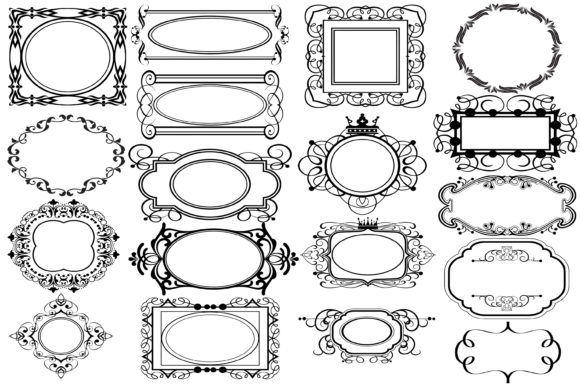
- 18 SVG vector files: Fully compatible with Silhouette Studio, Cricut Design Space, and other major cutting software. These are scalable and perfect for precision cutting.
- 18 PNG files: High-resolution images at 300 dpi with transparent backgrounds. These are ready for immediate use in web design, digital invitations, and sublimation printing.
- 18 EPS files: Editable vector files suitable for Adobe Illustrator, Inkscape, and other professional design tools. These allow for deep customization of shapes and colors.
- 18 DXF files: Universal vector formats that ensure compatibility with a wider range of legacy and specialized cutting machines.
This variety ensures that whether you are a beginner using a basic home printer or a professional running a large-format vinyl cutter, you have the right file for the job. The inclusion of transparent backgrounds in the PNG files is particularly valuable, as it allows you to overlay frames onto photos or colored backgrounds without unsightly white boxes appearing around the edges.
Final Thoughts on Elevating Your Designs
Incorporating a digital frame into your creative toolkit is a small step that yields significant visual impact. It saves time by eliminating the need to draw borders from scratch and ensures a consistent, professional aesthetic across all your projects. From enhancing wedding invitations with elegant wedding frames to streamlining product labeling with precise label frames, these assets support a wide range of creative and commercial goals. By understanding the strengths of each file format—SVG for cutting, PNG for digital use, and EPS for editing—you can maximize the potential of every design. Whether you are a marketer looking to boost engagement on social media or a crafter preparing for a holiday market, these versatile tools provide the foundation for beautiful, memorable creations.